How to Use Squarespace AI Tools for SEO Content (2026)
Leveraging the power of Squarespace AI tools is the single most effective way to scale your content strategy in 2026. If you are building your brand on this platform, you already know that content isn’t just "nice to have", it is the engine that pulls organic traffic.
However, with search engines tightening their quality expectations, publishing content is no longer about guessing what works.
Creators need consistent, data-backed, and structured articles. By integrating AI into your workflow, and using dedicated tools like SEOSpace, you can automate the heavy lifting, from keyword research to technical audits, while you focus on strategy.
Key Takeaways
Strategic Automation: Learn why AI performs best when guided by a clear SEO strategy using tools like SEOSpace.
Faster Research: Discover how to uncover content gaps and keyword opportunities in minutes using SEOSpace's keyword data.
The Hybrid Method: Master the art of using AI for drafting while retaining human nuance.
Traffic Light Audits: Use SEOSpace’s plugin to instantly check if your content meets Google’s standards before you publish.
Visual SEO: Learn how to identify missing alt text and image issues instantly using the SEOSpace audit tool.
Performance Tracking: Understand how to monitor your rankings and iterate on content post-publish.
Table of Contents
Why SEO-Optimized AI Content Matters in 2026
The online world in 2026 rewards depth, usefulness, and precision. Search behavior has evolved far beyond simple keywords.
People now ask complex questions like, "What’s the best beginner business blog strategy for Squarespace creators?"
To show up for these queries, your content needs structure and technical perfection. This is where SEOSpace becomes powerful.
Often called the "Yoast for Squarespace," it plugs directly into your site to guide your AI content generation, ensuring you aren't just writing good text, but ranking text.
By combining AI drafting with SEOSpace’s data, you can publish content at the speed Google rewards, allowing small teams to compete with large publications.
Phase 1: Topic Ideation & Keyword Discovery with SEOSpace
Before you write a single word, you need a clear map of what your audience is searching for.
Intent-Driven Research
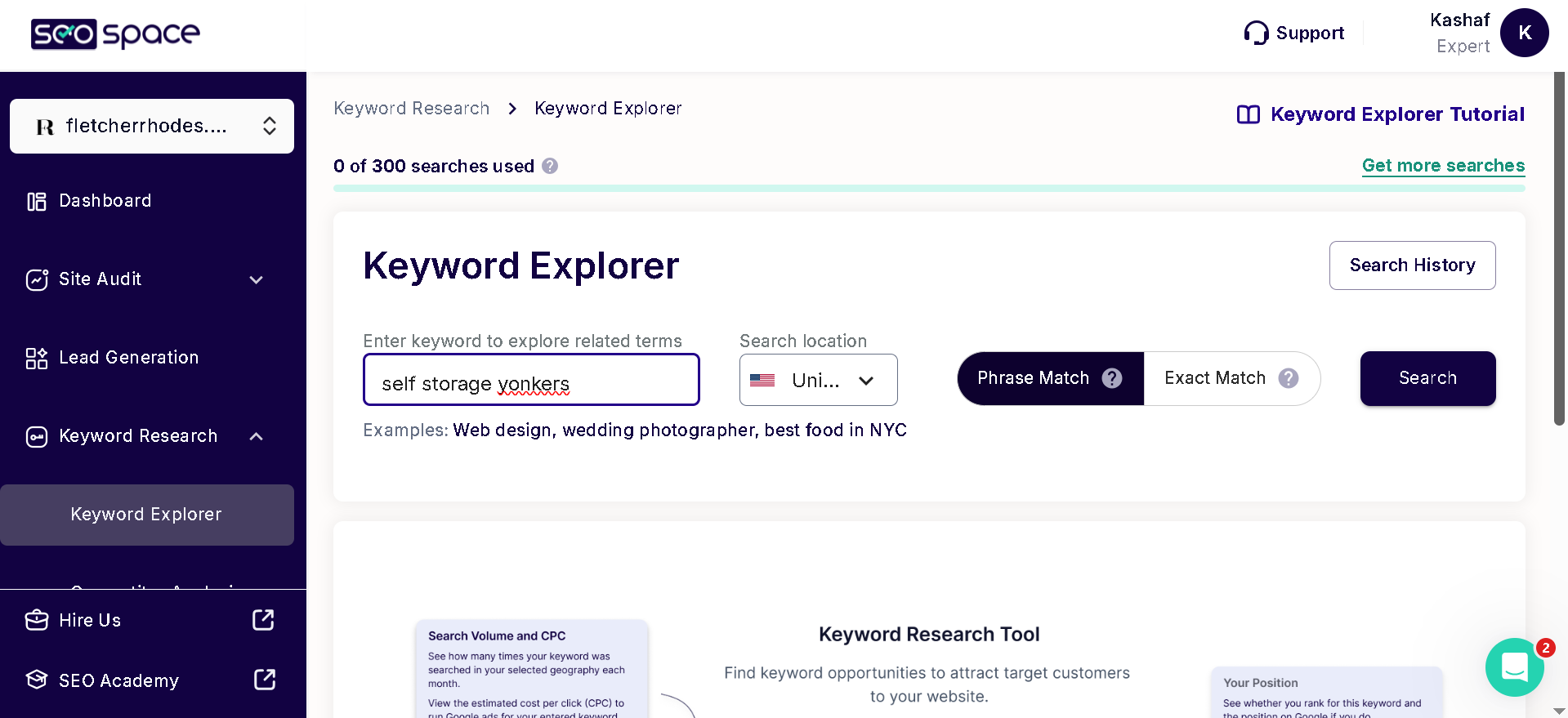
Start by using SEOSpace’s keyword research tool to find high-traffic, low-competition keywords specifically for your niche. Unlike generic tools, SEOSpace helps you visualize "Traffic Potential" directly within your Squarespace workflow.
Ask your AI writer (like ChatGPT) to brainstorm ideas based on these keywords:
"List 10 blog topics based on the keyword 'Squarespace SEO tips' found in SEOSpace."
"Generate an outline for a guide that answers specific user pain points about 'Squarespace plugins'."
Transforming Keywords into Concepts
Once you have your keywords from SEOSpace, group them by intent: Informational, Comparison, or Transactional. This ensures every article aligns tightly with reader needs.
Phase 2: Outlining Your Blog with AI
Once you have your topics, use AI to create a strong, SEO-structured outline. A disorganized post will kill your bounce rate, signaling to Google that your content is low value.
Ask your AI tool to:
Create an H1/H2/H3 outline based on the target keyword.
Map secondary keywords to specific sections.
Suggest internal linking opportunities.
Pro Tip: Run your proposed outline headers through the SEOSpace checklist to ensure you aren't missing critical headings or structural elements that Google expects.
Phase 3: Drafting High-Quality Content (The Hybrid Method)
With a solid outline in place, you can now use Squarespace’s native AI or external writers to produce a detailed first draft.
The Human-AI Hybrid Method
The secret to ranking in 2026 is the hybrid method.
AI Handles: Expanding sections, rewriting for clarity, and transitions.
You Handle: Tone consistency, real-life examples, and brand personality.
Ensuring Originality & Information Depth
To avoid generic content, inject authority. Ask the AI to provide stats, but verify them. Mention specific tools you use, such as SEOSpace for audits. This adds the "Experience" (the 'E' in E-E-A-T) that AI cannot fake.
Phase 4: Optimizing for Squarespace SEO Settings
Writing the text is only half the battle. You must now optimize the technical elements. This is where SEOSpace shines.
The "Traffic Light" Audit
Open the SEOSpace plugin on your draft page. It will give you a "Traffic Light" score (Red, Amber, Green) and a specific checklist:
Meta Titles & Descriptions: It will tell you if your AI-generated title is too long or lacks the keyword.
URL Slug: It will alert you if your URL is not clean.
Word Count: It checks if your content depth matches competitors.
Identifying Image Issues
Images drive traffic, but only if Google understands them. SEOSpace will instantly flag images for "Missing Alt Text", a critical SEO error that hurts accessibility and ranking.

Once SEOSpace identifies which images are missing data:
Scan: Use the SEOSpace audit to pinpoint every unoptimized image on the page.
Resolve: Use Squarespace's native asset tools or manual entry to add descriptive, keyword-rich text based on SEOSpace's recommendations.
Verify: Re-scan with SEOSpace to watch your score turn green.
Phase 5: Publishing, Monitoring, and Iterating
Once your blog is live, the real work begins.
What to Track
Use the SEOSpace dashboard combined with Google Search Console to watch for keyword movement. SEOSpace makes this data easy to understand for non-experts, highlighting exactly which pages are climbing and which need help.
Using AI for Post-Publish Improvements
If a post isn't ranking after 90 days, use SEOSpace’s audit tool to re-scan the page. It might suggest adding more keywords or fixing broken links. Feed these insights back into your AI tool to rewrite weak sections.
Conclusion
AI isn’t here to replace creators, it is here to empower them. With the right toolkit, specifically SEOSpace for strategy, audits, and keyword planning, you can publish more content with far greater precision.
Small businesses that adopt this Squarespace AI + SEOSpace workflow will outpace competitors who are still guessing. The tools exist. The strategy is clear. Now the opportunity is yours to take.
Ready to level up your Squarespace SEO?
CTA
Install the SEOSpace Plugin for free today and start ranking your Squarespace site on Google with confidence with a Free Audit.
Frequently Asked Questions
-
Squarespace offers great foundational tools, but SEOSpace acts as a dedicated SEO coach. It provides actionable checklists, keyword research, and real-time "Traffic Light" audits that go far beyond the native platform's capabilities.
-
Yes, but you should always validate them. Use AI to generate ideas, then paste them into your Squarespace editor and let SEOSpace audit them to ensure they are the correct length and contain your primary keywords.
-
Absolutely. SEOSpace identifies broken links, oversized images, and missing SSL certificates, ensuring your site's technical health is perfect for search engines.
-
It is recommended to run a SEOSpace scan every time you publish a new blog post. Additionally, you should re-audit older content every 3-6 months to identify opportunities for updates and improvements.
-
Yes. SEOSpace is designed specifically for Squarespace users who are not SEO experts. It uses jargon-free language and clear "Traffic Light" visual cues to make optimization easy for everyone.